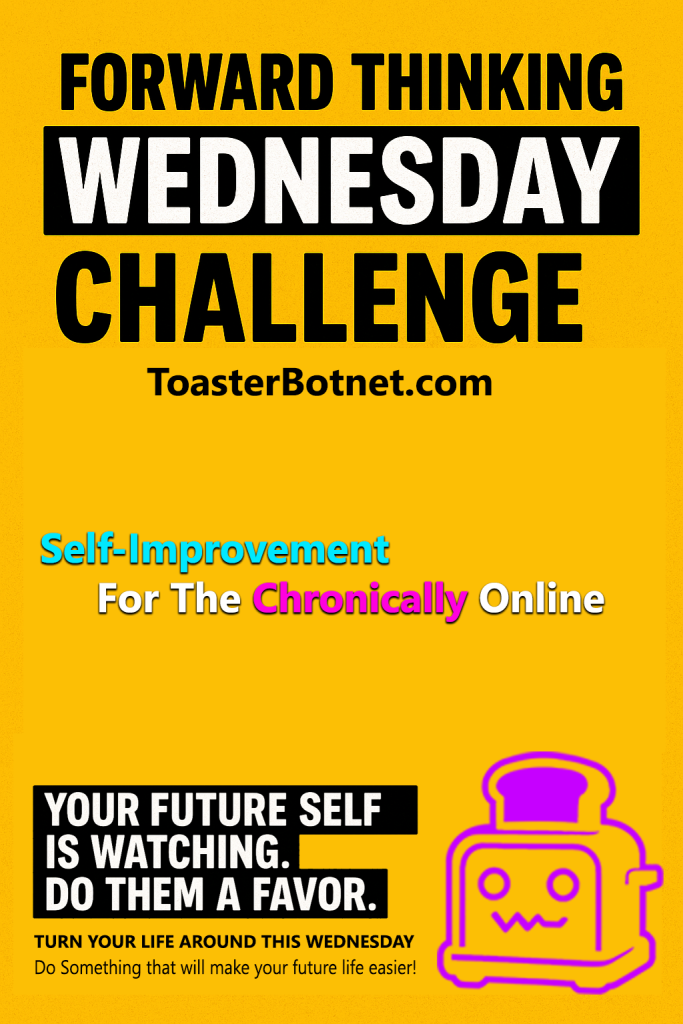
No long form video this week. Sorry. I need a break.
Will be back in a bit and continue shitposting as ASAP as possible.

No long form video this week. Sorry. I need a break.
Will be back in a bit and continue shitposting as ASAP as possible.

Most selfโimprovement content feels like it was designed for a different species of human.
Wake up at 5 AM. Cold showers. Dopamine detox. Monk mode. Lift heavy. Stare at the sun. Donโt touch your phone. Donโt have fun. Suffer harder.
Or, on the other extreme: grindset entrepreneur cosplay. Passive income promises, productivity porn dashboards, and the constant implication that if youโre not winning, youโre lazy.
That whole ecosystem misses something obvious.
Most people donโt fail because they lack discipline. They fail because their lives are disorganized, overloaded, badly structured, and full of friction.
I didnโt build ToasterBotnet because I wanted another selfโhelp brand. I built it because none of the existing ones matched how life actually feels when youโre online, overloaded, anxious, curious, and trying to get your shit together in a modern world.
Iโve been through the messy parts. Mental health problems. Chaos. Feeling behind in every dimension of life. A brain that never shut up. Too many tabs open mentally and literally.
What actually helped wasnโt more suffering. It wasnโt discipline theater. It wasnโt pretending technology was the enemy.
It was systems.
Writing things down. Offloading cognition. Using calendars, task managers, automation, templates, reminders, and boring infrastructure to reduce mental load.
Once the chaos was handled, progress becameโฆ quieter. Less dramatic. More stable. And way more sustainable.
Thatโs the core insight behind my project. You donโt need to become harder. You need to become better structured.
Selfโimprovement online has an aesthetic problem.
It takes itself way too seriously.
Everything is framed as a moral struggle. Productivity as virtue. Rest as weakness. Humor as distraction.
That doesnโt work for people who grew up online. People whose brains are shaped by memes, tabs, feeds, notifications, and absurdity.
My Youtube Channel is my answer to that mismatch.
Itโs selfโimprovement without the macho posturing. Itโs growth without pretending the internet doesnโt exist. Itโs discipline without killing curiosity and playfulness.
Hence the tone: Semiโironic. Selfโaware. Occasionally unhinged.
If you canโt laugh at the process, you wonโt survive it longโterm.
A lot of modern selfโhelp treats technology like a demon that must be exorcised.
Thatโs lazy thinking.
Technology is a multiplier. It can destroy attention or save it. It can overload your brainor offload it.
The difference isnโt screen time. Itโs intentionality and structure.
I embrace tools that:
Don’t throw away your phone. Use it like a power tool instead of a slot machine.
Thereโs a reason the project has multiple layers.
Serious longโform content lives next to memes. Systems thinking sits next to shitposting.
Thatโs not confusion. Thatโs honesty.
Internet culture is absurd, creative, nihilistic, insightful, stupid, and brilliant. Often all at once. Ignoring that doesnโt make you wise. It makes you disconnected.
The ShitPostBlog exists because:
Shitposting is art. And occasionally, itโs educational by accident.
ToasterBotnet is for:
Itโs not for:
If you want tools, frameworks, humor, and a realistic path from chaos to stability you are int he right place.
ToasterBotnet isnโt just my online handle. Itโs an ecosystem.
A central hub. A content lab. A meme archive. A public thinking process.
Iโm not pretending to have everything figured out. Iโm documenting what actually works, stressโtesting ideas, and sharing the process in public.
Still online. Still not touching grass. Still improving.
If that resonates, youโre already part of it.
Welcome to the era of the ironic selfโimprover.
Iโm running a YouTube channel and social media persona as a one-person media startup.
The absurd part: I built the infrastructure first, and the audience never really showed up (yet).
I currently have ~170 subscribers. The stack looks like something meant for 100,000.
What I built anyway:
Most creators scale tools after growth.
I did it backwards:
I treated this like a startup from day one and built for scale with basically no demand.
That sounds irrational. It probably is. But it was a lot of fun.
The Youtube Automation Pipeline:
I built a Youtube Automation Pipeline with shell scripts and python scripts,
which is all baked into my Linux ZSH environment.
Basically my Linux machine is a Youtube Creator Environment now.
It’s super bad code, it’s extremely personalized stuff and I can’t publish it on github or people will laugh.
But I will tell you what I did maybe some people will get some inspiration what’s possible.
But here’s the breakdown of the workflow:
I run a shell command that initialized the next video,
It opens a META Data File in vim and I fill out stuff like
title, video number, playlist and some other variables.
then it immediatly populates my environment with templates and directories
for the new video.
- Photoshop Thumbnail templates
- Promo material templates
- Several other graphic assets I need
- a text file with keywords
- a text file with hashtags
- a text file with the video description
- a text file with SEO optimized text that describes the video
- Directories for everything I need: Raw Video, Rendered Files, Graphics, Sounds, Effects, etc
- A bunch of symlinks that all point directly to the assets for fast access and reduced friction in the workflow
- a Whatsapp bot sends me information about the new project
- a status on top of my linux terminal always shows me at which step of the pipeline I am
Everything is done with python, zsh scripts and a lot of ffmpeg.
I also have a meme blog where I automate my shitposts but that’s another story.
Even though I totally know that I am over-engineering this like a crazy nerd,
I will still continue to improve and iterate and add to it.
Because this is super fun and it makes work super low friction.
I can make videos faster and I am still improving and I have fun doing it,
because so much of the process is automated.
Anyway I though you might be interested.
Making My Website Robot-Friendly
The next iteration of SEO is all about AI. I’m taking it a tiny bit further and want to be ready for an AI age.
โIโm calling it Machine-Friendly Architecture. Instead of fighting AI crawlers or putting up “No Trespassing” signs, I decided to build a “Welcome Mat” for them.
Everybody is blocking AI crawlers, I’m doing the opposite. I’m actively creating frictionless features into my website for our robot friends.
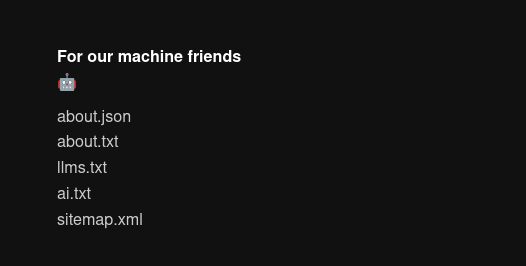
This is currently my footer on my main landing page:

โWhat I did:
I set up a decentralized brand ecosystem (ToasterBotnet) that is effectively an ecosystem for my online-activity.
โTo make it readable for LLMs, I added:
โThe Theory:
The modern web is 90% bloat. When an AI agent scrapes your site, it wastes context window on cookie banners and JS tags. By providing a “raw” layer, Iโm essentially giving the AI a cheat sheet. If an AI recommends “ironic self-improvement” next year, I want it to pull from my structured data, not a hallucination.
Examples:
https://toasterbotnet.com/llms.txt
https://toasterbotnet.com/about.txt
https://toasterbotnet.com/about.json
https://toasterbotnet.com/ai.txt
Point is. With this I give llms compressed information on what I am about and what I am not about. Without needing it to make stuff up, hallucinate or crawl HTML and mabye get the wrong impression when it finds random posts.
LLMs will provide information no matter if it is correct or hallucinated in some cases. It might as well be the correct information.

Okay I finally made the switch. I wanted to do this for a long time. It took me an entire day of non-stop configuring, scripting, googling and troubleshooting. Thank god for ChatGPT or this would have taken me a week or something.
decided to go with mechabar which is a pretty cool waybar theme:
https://github.com/sejjy/mechabar

The hardest part was making everything behave more like Awesome WM. I’m old and I can’t learn new tricks. At some point things just have to work the way my muscle memory works. I don’t want to painfully learn new workflows and shortcuts and concepts.
Luckily I found this plugin:
https://github.com/Duckonaut/split-monitor-workspaces
After that and some heavy tinkering I finally got a setup that I can work with.
The rest was adjusting the config so it can work on multiple devices, and autostart scripts, custom lockscreen and creating custom keybindings. vim clipboard was a pain in the ass. I also had to switch from urxvt to kitty or else I would have missed a bunch of features.
But I’m happy now. It behaves almost like Awesome WM and it is new and shiny and I’m now in the cool kids club again and no longer that old fart, that still uses Xorg and Window Managers from before the war.
Also updated all my install scripts. So I won’t have to reinvent the wheel.
Still have some minor issues to tackle. But I’m calling it a day.

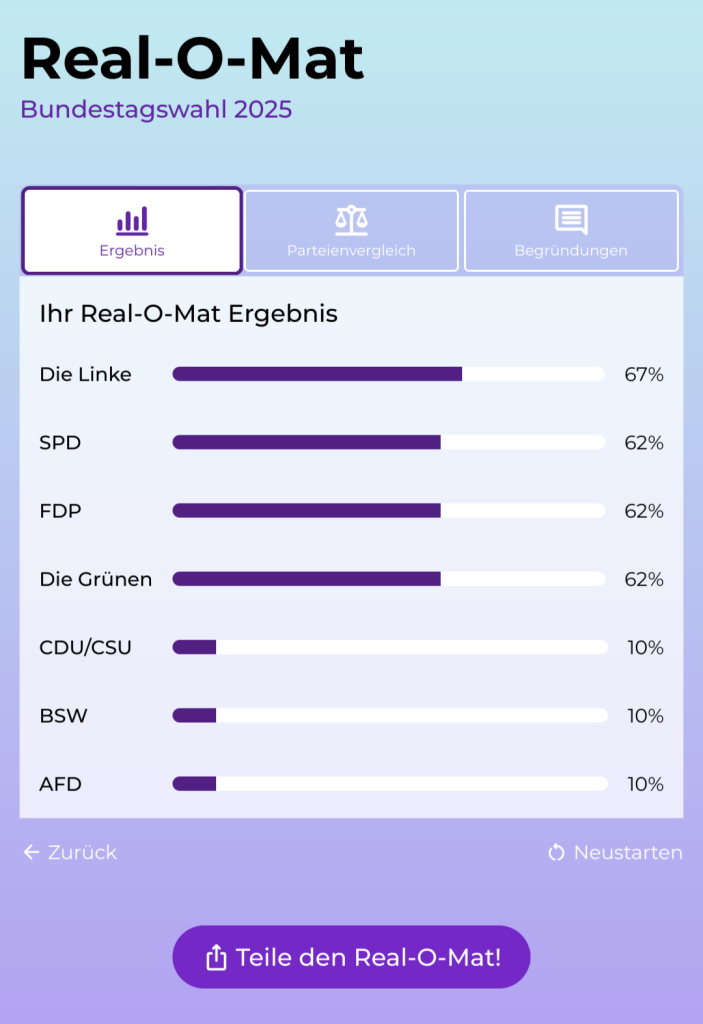
Erstaunlicherweise nur 67% fรผr die Linken. Aber um ein Zeichen gegen Rechts zu setzen werd ich dieses Jahr extra hart Links wรคhlen und so stark mein Kreuz machen, dass mir die Arme krampfen. Bella Ciao!


Wish you all a happy new year.
I hope your 2025 will be awesome, productive, full of memes and successfull. And may your portfolios be forever green and perma bullish. Don’t forget to write down your goals and go out of your comfort zones. Come back here and check the memes, I’ll be here shitposting all through 2025.
— ToasterBotnet
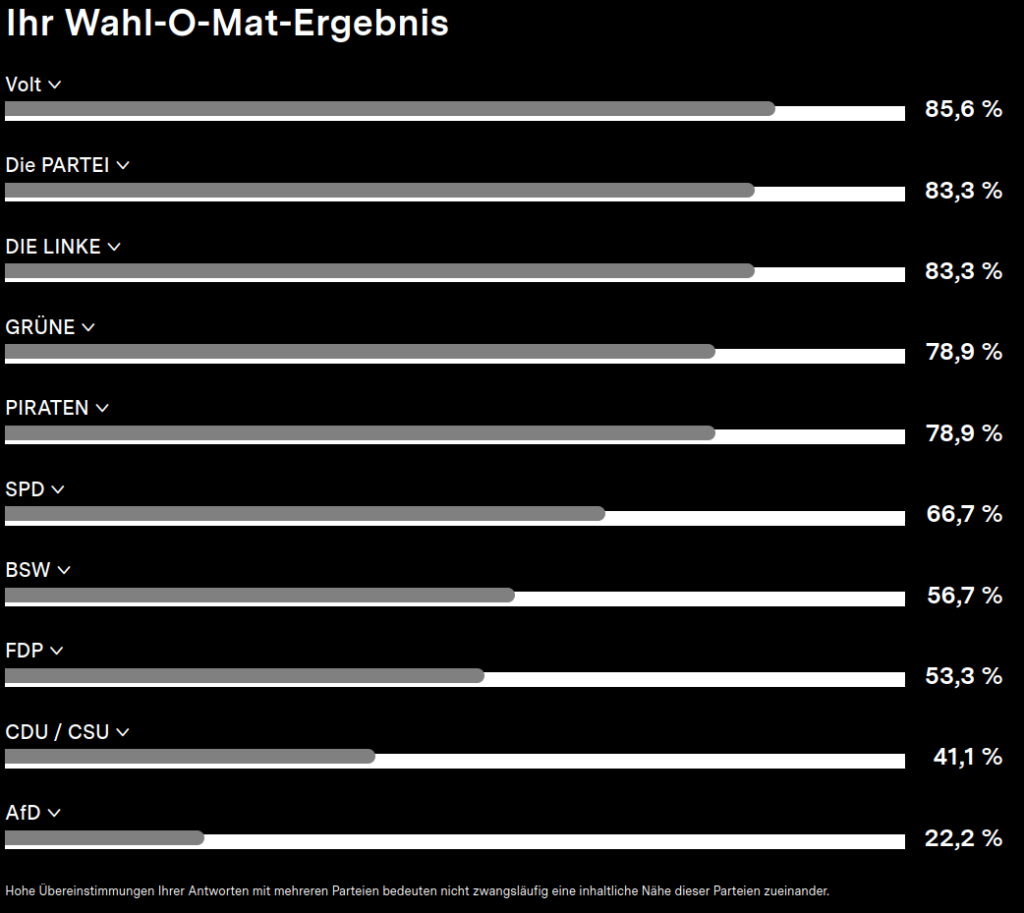
Still mostly the same every time I click trhough this thing
So it’s either Sonneborn or Volt xD


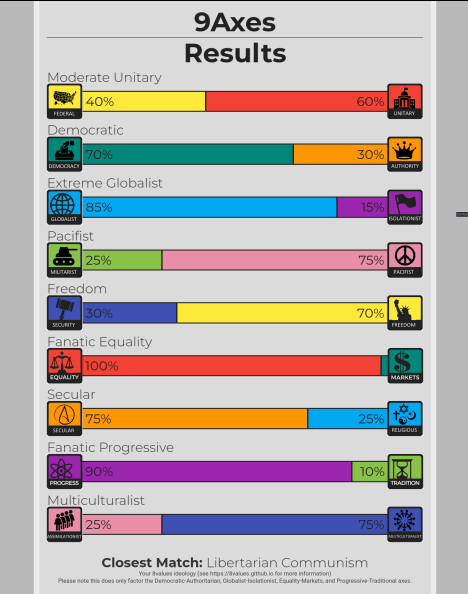
Everyone is surprised, but not me … pinko scum that I am xD
Test Yourself here: https://9axes.github.io/
Okay so it’s may again.
And it’s been one year so far.
In 2022 I started with the intention of having no more Zero-Days. My approach was to plan one week ahead, every week. And then stick to it, no matter what. And guess what? It actually worked. Well I have one small rule. If I accomplish all my tasks in advance I can take a day off without calling it a zero-day. And I lived it every single day for a year. I had my ups and downs. There were days were I was super productive and then there were days were I barely even got one thing done. But I was “grinding” every day. And I have to say I’m happy about it and I will probably continue with this in the unforeseeable future. I got a lot of shit done and in hindsight was more productive then ever.
But I noticed a few times that you shouldn’t overdo this and be reasonable and realistic during planing your week or you’ll quickly get into burn-out territory.

I should do a video about this …
I’m feeling very lazy today and since ChatGPT has recently gone viral I thought I could let it write a blogpost for me. So without further ado, here’s a post about the positive sides of social media:
Social media has often been portrayed as a negative influence on society, with concerns ranging from addiction to cyberbullying to the spread of misinformation. However, it’s important to recognize that social media also has many positive aspects and has played a significant role in transforming our society for the better.
One of the most significant ways that social media has transformed society is by making it easier for people to connect with one another. In the past, it was difficult for people to stay in touch with friends and family who lived far away or to make new connections with people who shared similar interests. However, social media has made it easy for people to connect with others, no matter where they are located. This has allowed people to form friendships and communities that might not have been possible otherwise.
Another way that social media has transformed society is by giving people a platform to share their thoughts and ideas with a wider audience. In the past, it was difficult for individuals to get their ideas out into the world, as they had to rely on traditional media outlets or other gatekeepers to spread their message. However, social media has given people the ability to share their thoughts and ideas directly with others, allowing for greater democratization of information.
Social media has also played a significant role in social and political movements. In the past, it was difficult for people to organize and mobilize around a cause, but social media has made it much easier for people to connect and collaborate on issues that matter to them. This has led to the rise of numerous social and political movements, such as the Arab Spring and the Black Lives Matter movement, which have had a significant impact on society.
In addition to these more broad societal transformations, social media has also had a number of more specific positive impacts. For example, it has made it easier for people to promote their businesses and reach new customers, it has given artists and creators a platform to share their work with a wider audience, and it has even played a role in reuniting lost loved ones.
Overall, while it is important to recognize the potential negative impacts of social media, it is also crucial to acknowledge the many ways in which it has transformed society for the better. From making it easier for people to connect with one another to giving individuals a platform to share their thoughts and ideas, social media has had a significant and largely positive impact on our world.
Releasing an App on the Google Play Store was quite the learning experience.
It took forever to go through all these questionaires and you need to pay 25 Dollar up front for a developer account. And if you went through all that and you upload your first app, you need to wait for Google to review it. For me this took a few days for the first version and 1 or 2 days for an update. So if you have a bug fix or want to release something quick this is quite annoying.
But I actually want to learn a bit more about mobile apps and Android studio.
I have a few ideas what I want to do. Let’s see. If I have time and nothing better to do I will probably go through some tutorials and courses, so my 25 Dollar payment wasn’t in vain ๐
I just got a new Thinkpad and noticed the Arch installer is really good now. I also like the minimal approach. I will probably reinstall again in 10 years or so but I automated my complete install now. Went trough it with a checklist and automated everything from installed software and configs file up to browser bookmarks. Now I can just load the json files of the installer and run my own scripts for personalization. Neat. Long story short I like the new installer.
I’m still on my minimalism journey
and just reached a new plateau.
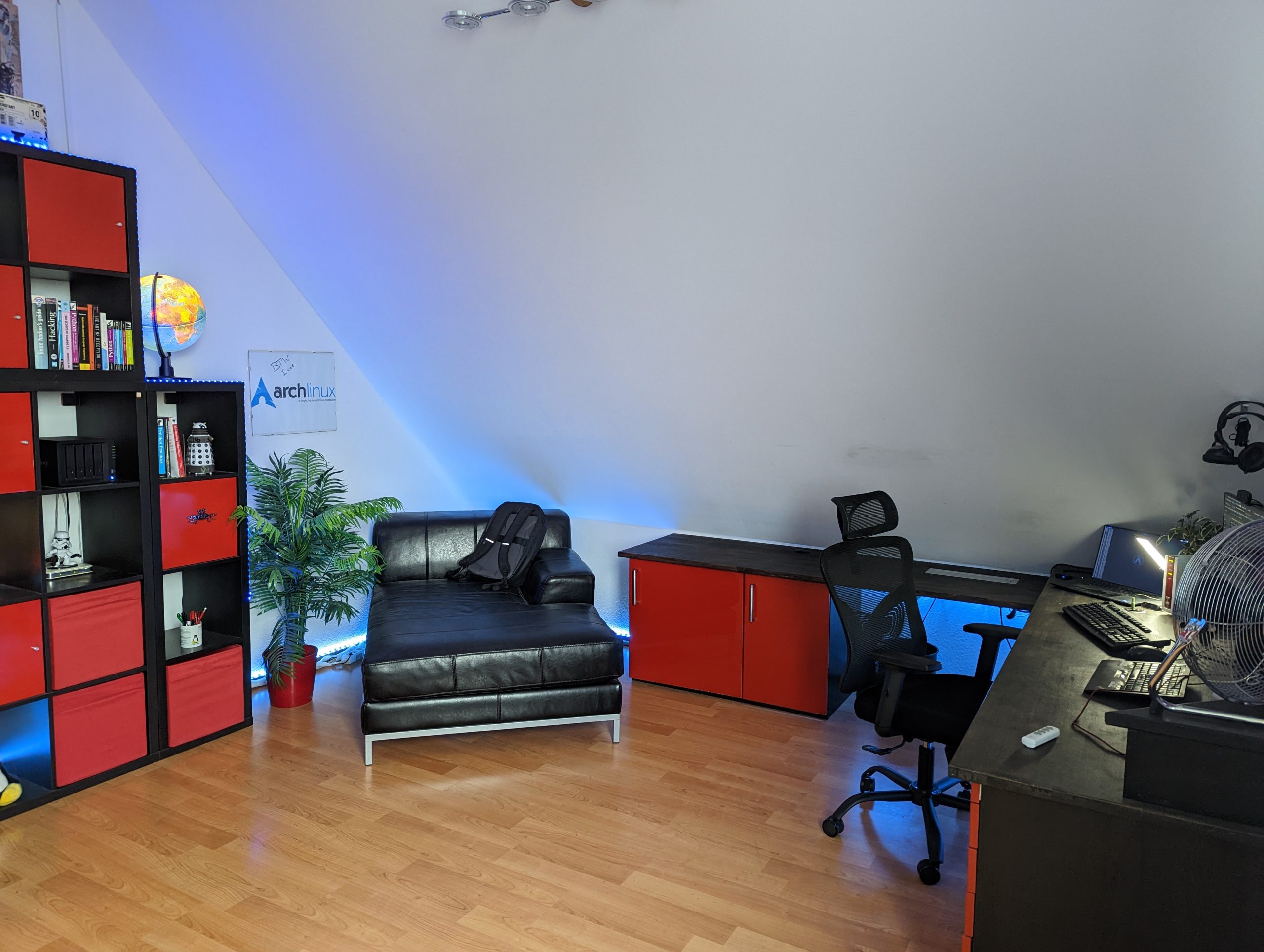
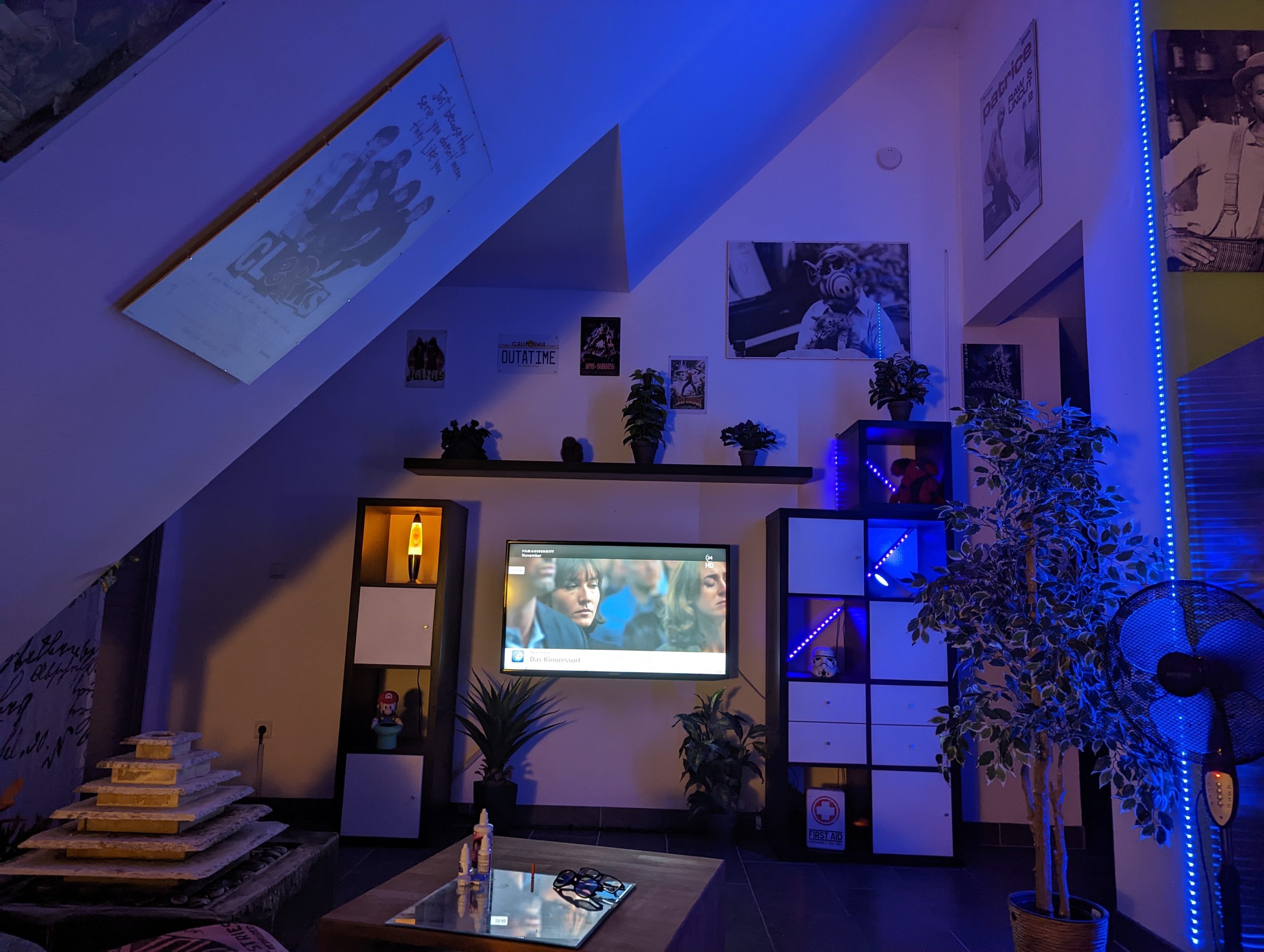
This week I started to get rid of furniture like shelves
and donated most of my old books.
And I also sold a ton of stuff on ebay.
And I’ve reached a point,
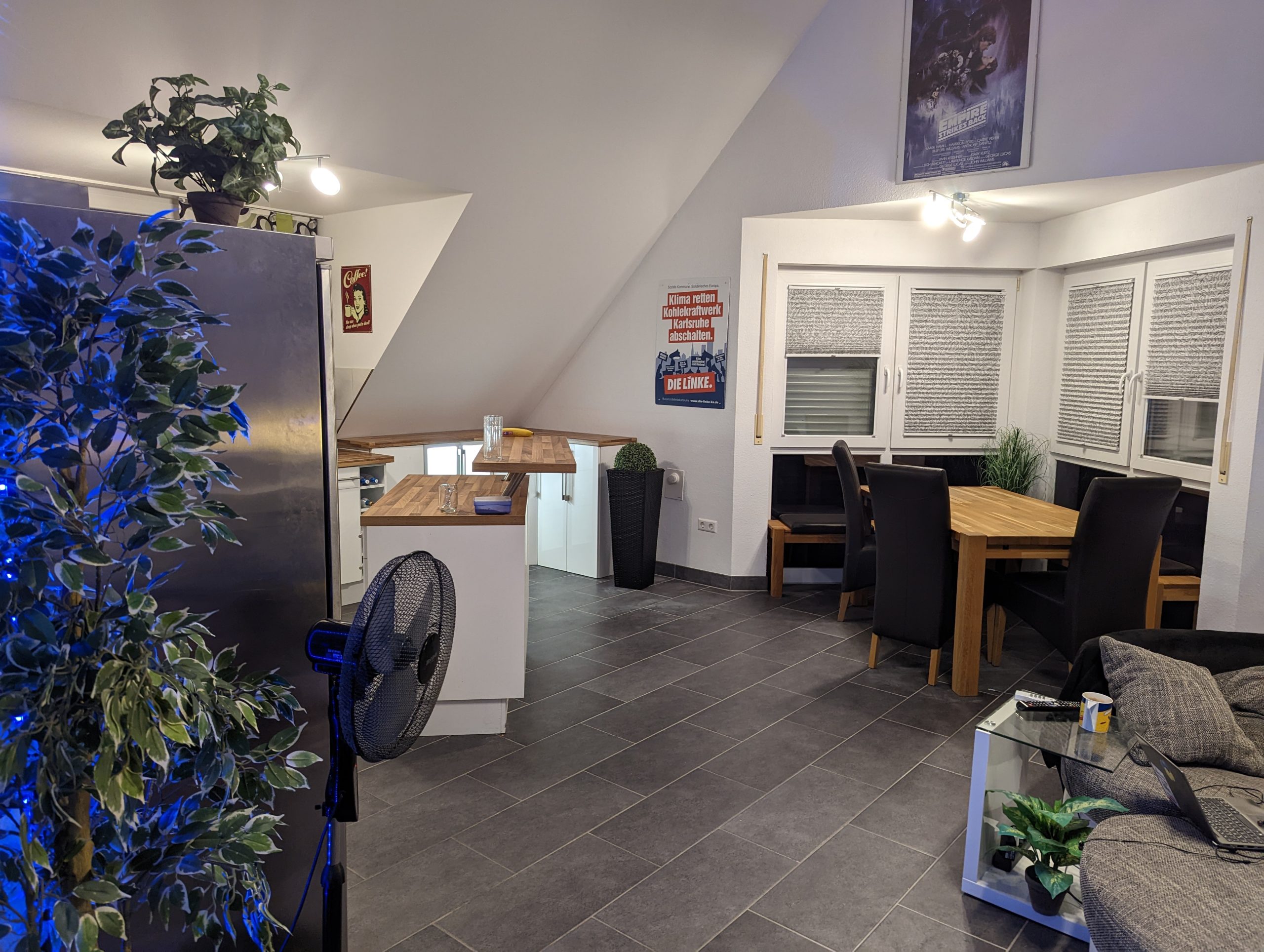
where I’m happy with my appartment again.
It looks cleaner and tidier than ever.
I think this will do for a while.
It’s time to settle a bit and think about
what I want to get rid of next.
Right now I feel relieved and satisfied.
But that’s probably just temporary.
I’m sure the next big purge will come ๐


For those of you that scrolled through my shitpost blog,
you might already know that I like to live a minimalist lifestyle
and I’m also a self-proclaimed datahoarder,
who collects terrabytes of stuff on a homeserver.
That does sound like a contradiction, doesn’t it?
How do those two go together?
If I want to embrace minimalism,
why am I hoarding so much stuff on hard drives?
Shouldn’t I practice digital minimalism
to free myself from the digital clutter?
Well there’s fine distinction to make here,
which explains why datahoarding and minimalism go together quite well.
Let me explain….
I like visual and mental minimalism. Visual is obvious. Cleaner surfaces, less clutter, not much to clean, open spaces, no materialism, frugal living, not buying stupid shit, and so on and so on and so on.
Data doesn’t take up physical space. So we are good with this one.
Let’s move on…
But with the mental minimalism, the one that helps to clear your mind,
there’s difference on how to approach this.
Some may say you should reduce digital clutter and data
to free up headspace, clear your mind and have less distractions.
But I beg to differ.
While digital minimalism may work for some people
and helps them to stop waisting time on instagram and
having a zero email inbox, I have a different proposal.
First of Apps, Tools, Organizers, Calendars
or better yet the internet as a whole, just is so convenient.
You can be much more productive and much more efficient if you use your smartphone and computer as a tool to organize and manage your life.
So I don’t know why some people on reddit think going back to a flip-phone is the holy grail of digital minimalism. It just makes your life unecessary complicated, hard and tedious.
But that’s another story.
I wanted to elaborate more on my datahoarding and how it is still a minimalistic lifestyle. I have a lot of data, but all my files are categorized, organized, indexed and remotely accessible. If I need to check something I can find it instantly with my phone. This goes for work contract, or my latest eletricity bill or even my 4th grade school certificate. Photos, Videos, Projects, Code I wrote 5 years ago, that random meme I photoshoped in 2013, … You name it. I have everything in my digital vault and I can find and access it instantly on my phone from everywhere in the world.
This makes life just so much more easy and conveniant.
I also live entirely paperless. Everything is digital. It’s super efficient.
And if it makes my life easier, I don’t want to declutter and go all minimalistic on my hoard. Why would I? Hard Drives are relatively cheap.
But that’s not all. Besides it beeing awesome to have instant access to all my data all the time, I also have a place to dump my notes, tasks, project plans, reminders and random files into my productivity systems and in my archive.
I can write down and archive every thought I want to remember and can tag it and archive it for later.
It frees up so much mental space and clears the mind.
In this case you can actually say … Sometimes MORE IS LESS
And this is why datahoarding and minimalism can go together ๐
have a pleasent weekend everybody
Creating a Youtube Video is fucking hard as fuck. I have some expierence with Video Editing and even did an hour long Snowboard Movie once. So this is not my first project. But holy shit, talking to a camera was way more difficult than I initially thought. I mean. I didn’t think It would be easy. But man that shit was amateurish as hell. I couldn’t even remember a single sentence for longer than a split second. always stuttering and loosing thought. I think I have to do away with the strict scripts and just speak more freely and more relaxed.
Besides being a total dork on camera, I see like a million things to improve. It’s cringy as hell, but if I don’t upload, I won’t improve. I need to just own it and keep posting.
So onto Number #2 ๐
…When you realize you are actually making progress.
Just today I was sitting on my couch and had the urge to do something productive. But I didn’t exactly know what to do. I believe I have all my shit together. Nothing can be optimized or improved, well at least not that I’m aware of. Chores are all done. I’m on track. Everything is taken care of.
And suddenly that weird feeling of anxiety overcame me.
It took me a while to realize… I actually reached a lot of my personal goals and I’m on track with all my plans. But … what … now ? I just couldn’t relax. I had this anxious feeling to do something… anything. And this is when it hit me. I need to move forward already and start something new.
It’s time for a new project. And I have a couple of ideas.
I immediatly starting braindumping and planing tasks to start to get creative again. And when I was done I realized I’m actually making progress because I feel ready to tackle new challenges.
Feels good man. So this is progress ? Seems like it.

Achievement unlocked. HAVE MY SHIT TOGETHER ๐
I’m going overboard with Todoist. Why the fuck am I enjoying time management so much? It’s weird. But it kinda gives my deprived brain the dopamin rush it needs. I’m way too much into organizing the shit out of my schedule. Custom Filters and Tags are neat. They allow me to fine tune the app to get exactly the workflow I want. It kinda reminds me when I first moved from Excel Sheets to YNAB. These tools just gamify the boring stuff and you can spend hours tweaking it exactly the way you like it. Well at least it works. And it does work… way better than my old app, which was basically just a bunch of lists. But I noticed I’m not the average user. went from beginner to intermediate karma level in 2 days of using the app. Probably because I added so much tasks. I have the weirdest hobbies. I even have two accounts now. One main one and one for work.

Alright I moved my entire Workflow to ToDoist. The App convinced me. immediatly subscribed to the pro version and moved all my tasks over.
Since a couple of years I have a system of recurring Tasks, which allow me to basically run my life on autopilot. But I wanted everything a bit more fancy and needed more control. Todoist was exactly what I was looking for.
So I moved a total of 600 Tasks and Reminders over. Including the settings for each task. Took me my entire Sunday. I was moving everything manually one by one. I hope it was worth it.
Okay. I’ve done it.
I bought all the dips yesterday and I’m all out of money now.
I doubled down on a lot of stocks. My portfolio looks horrible. But at least I’m not in the red in overall returns.
So if everything drops even more now, you can thank me, because that’s probably because I bought. I can’t buy more dips now. I’m broke.
It’s Rice and Lentils for me now. But I’m expecting a Lambo in return.
So I’m waiting for a recovery now. If the US goes full recession mode now, I’m fucked. I hope for the turnaround and will bite my nails, while I look at my stock portfolio dipping deeper into the red. If everything goes south, I have a bridge nearby, in case I get tired. So no worries.
Good luck to all the other apes out there. May your candles be green and your gainz plenty. God help us all.

Recently I read this hypothetical blogpost here .
Got me thinking. Maybe I should think about my backup strategy.
I should use an old encrypted smartphone as emergency backup and 2FA and keep it in a safe place offsite. If my place burns down and my phone with it at the same time, I might be screwed. Not only would I lose all my stuff, I’ll probably lose access to my complete digital life. At least most of it. I might still get access to some of it with some effort, because I have some offsite backups in place. But using a backup phone would be a better solution and would include banking apps and services I’ll probably want to have access to in case of an emergency. A safe deposit box would probably be a good idea. Would cost a bit of money but it would be like insurance for worst case scenarios.
Am I overthinking this?
If you want to access your NAS internally and externally you might run into the problem that you have to run port 5001 on your LAN and port 443 externally as port redirection. You could run on port 5001 externally aswell but that can cause problems if you want to access your box somewhere with strict firewall rules or if you want to share stuff with people. So it’s way more conveniant to just use 443 externally. If you want to run your synology directly on port 443, though, it tells you that this port is reserved and cannot be used.
You end up with a setup where on LAN you use port 5001 and for remote you redirect port 443 to 5001.
So now you have the problem that you are using different ports when your phone or laptop are on your WiFi or when they are connecting from remote. So how can you avoid changing ports in your DS Apps all the time ?
Well I found a workaround for this.
Just install web station. Change the backend to apache and add a .htaccess file to your webroot with rewrite rules:
RewriteEngine On
RewriteCond %{SERVER_PORT} 80
RewriteRule ^(.)$ https://yourdomain.com/$1 [R,L]
RewriteCond %{SERVER_PORT} 443
RewriteRule ^(.)$ https://yourdomain.com:5001/$1 [R,L]
Now I can configure all my apps to use 443 as default and when they connect to the wifi they get redirected to 5001 internally. Also I can forward port 80 external to port 80 internal and now Letsencrypt works for auto-renewall. And for a bonus externally now port 80 redirects to https aswell.
Aren’t you all glad that technology is so straight foward all the time with obvious solutions? Synology could just let you use port 80 and 443 for your DSM Webportal in the first place. But who wants to do it the easy way if you can do it the hard way instead?
Have a great day ๐
So a couple of days ago I got a letter.
Back in 2019/2020 I’ve send a job application to a company and they got hacked lately… appearently. Or to be exact: They outsourced their hiring process and the company that does the applicant-management for them got hacked. Now they have send me a letter, that my resume and other data was probably affected, even though, they are required to delete such data within 6 months.
The sentence that my “data was still present at the database level without their knowledge” was nice but … that’s just a load of bullcrap.
How hard is it to write a cronjob which nukes database entries after 6 months?
If the law requires you to delete data after 6 months, I believe that includes the fucking database level you imbeciles.
Now my data is somewhere on the darknet and I’ll probably start getting spam, phishing and whatnot on my email and phone. Thanks I guess.
Well…
It all started way back, when, like many people, I had a bunch of external hard drives and a total mess in terms of data organization. And how it goes in these scenarios… I lost my precious data. The drives did break and I had no backups. There are still a lot of projects and files, which, to this day, are missed very dearly. It was mostly a bunch of 500GB disks and smaller ones. Puff ! gone !
Around 2012/2013 a friend of mine gave me a 2TB drive. I attached it to my home server and I started collecting, like many datahoarders out there, “Linux ISOs” from scratch again, since, you know, my hoard ( if you could call it that ) was gone. This time my organization was much better and I even started to make backups of the most important files.
Fast forward to the beginning of 2015, I bought a NAS. I wanted something, that doesn’t need a lot of maintenance and can scale. At this time I still had a webserver and a mediaserver in my appartment. But I wanted a central storage, which, well, just works. So I bought a synology with 4x4TB drives. So 16 TB of raw storage. Finally I had a storage with RAID. But, as you all most certainly know already, RAID is not a backup.
And that’s were the fun began.
I bought additional drives and hooked them up, so I can rsync the most important stuff and have at least one full backup at all times. I also started to make random copies, here and there to have offsite backups. After all, I had collected a fine amount of data again and still remembered how I lost all my stuff before. This time I wanted to do everything right. No more losing data.
I discovered r/DataHoarder. And I thought. Holy shit: they are just like me. Except some of them had storage arrays in the 100s of terabytes. But I’ll probably get there… some day. So I felt motivated and continued collecting Linux ISOs. 2019 my NAS broke. Immediatly bought a new one , same model and kept going.
My storage slowly started to fill up. In 2020 I bought more drives to increase my capacity. I went from 4x4TB to 4x8TB and 16TB for backup.

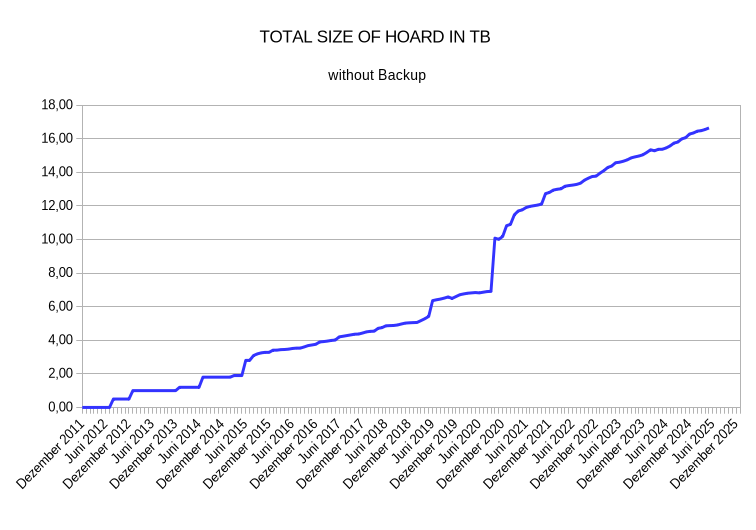
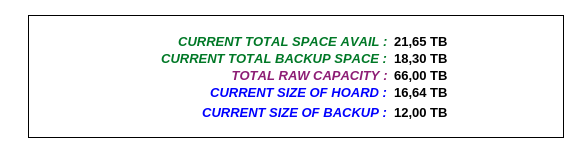
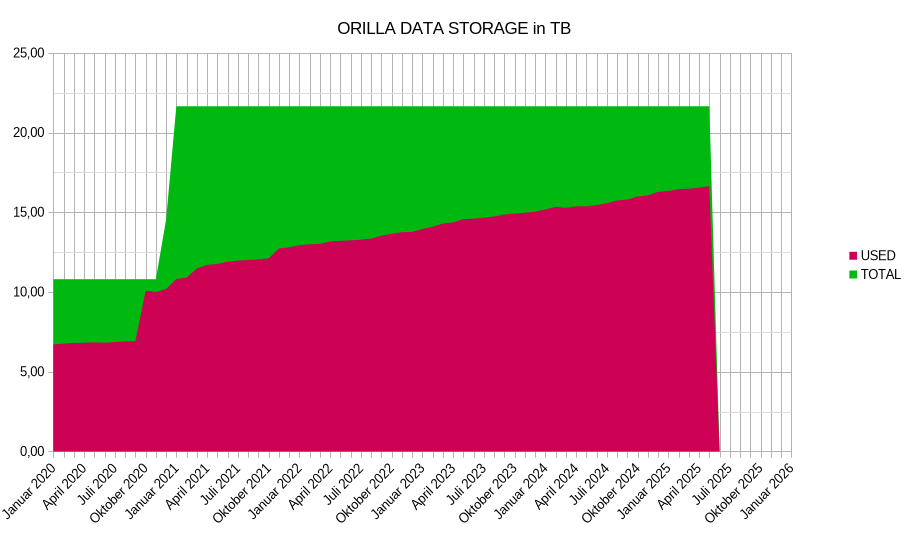
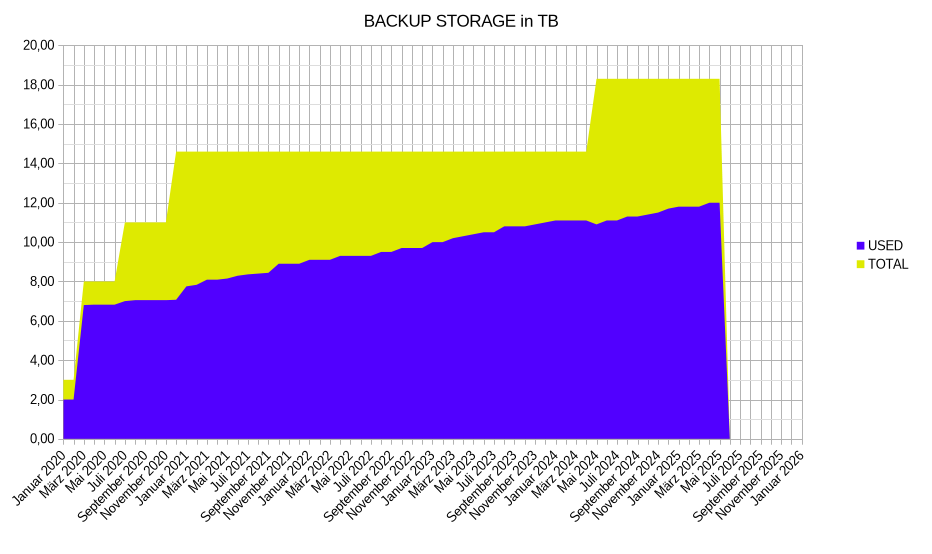
I’m currently at 65,5TB RAW Capacity. But my actual hoard is just 13,21TB. A lot of it is duplicated and hence, a lot of TBs are used for backups. Also a lot of it is used for RAID.

As you can see the hoard is slowly growing over time. At this pace I still have some room to grow, but I already think about upgrading my equipment to more drive bays and bigger drives.

The size of the actual hoard, makes some bumps from time to time. That’s when I’m on a collecting spree or copying stuff from friends. So these are my current numbers:

I also calculated the expenses for this weird hobby and I’m currently at 2790,30โฌ for everything so far. If I take 2015, when I bought my first NAS, as a starting point, the current monthly expenses for my datahoarding are at 33,22โฌ.
So HAPPY HOARDING everybody.